Google Keyword Planner vs KeywordsDB: A Better Alternative
Igor Silva
Founder of KeywordsDB

A Friend in Need - Cassius Marcellus Coolidge
If you've ever tried to use Google Keyword Planner as your primary keyword research tool, you've probably run into its frustrations: setting up a Google Ads account, entering a credit card, navigating a UI designed around buying ads rather than doing research, and then ending up with a list capped at 1,000 results that may not even reflect real search volumes accurately.
KeywordsDB is a Google Keyword Planner alternative built specifically for keyword research — not ad buying. This post breaks down the key differences so you can decide which tool fits your workflow.
Quick Comparison
| Feature | Google Keyword Planner | KeywordsDB |
|---|---|---|
| Sign-up | Google Ads account + credit card required | Email or Google sign-in, no credit card |
| Access model | 700 free searches per day | 10 free searches, then $9/month for unlimited access |
| Search method | Seed keyword required | Filter by keyword, volume, CPC and/or competition |
| Results per query | Up to 1,000 keywords | All matching results in the database |
| Volume accuracy | Low, typos share volume with real keywords | Statistical estimation for more accurate per-keyword volumes |
| Data sources | Google Ads only | Google + Bing |
| Database size | Not disclosed | 300M+ keywords |
| UI focus | Ad campaign management | Keyword research |
Getting Started: Sign-up Friction
To use Google Keyword Planner with full access, you need to create a Google Ads account, enter business purpose, your address, etc. You even have to put credit card information and accept a 10$ charge that is later reversed.
KeywordsDB reduces all the friction. You sign up with your email or Google account on a single screen, then you are immediately redirected to the dashboard with 10 free searches, ready for your first query. No credit card, no billing setup, no campaign required. Here's an interactive demo for you to check out.
Keyword | Intent | Volume history | |||
|---|---|---|---|---|---|
How Keyword Discovery Works
Google Keyword Planner is built around a seed-keyword workflow: you enter one or more terms, and it returns up to 1,000 related keywords. That cap is a real limitation when you're trying to map out a competitive niche or find long-tail opportunities — the tool may simply not surface the terms you're looking for.
KeywordsDB gives you direct access to the full database of 300M+ keywords. You can:
- Search by seed keyword — works exactly like Keyword Planner, but returns all matching results, not just 1,000
- Filter without a seed keyword — browse by volume range, CPC, competition level, or any combination
- Sort freely — high CPC with low competition, for example, instantly surfaces monetizable gaps regardless of topic
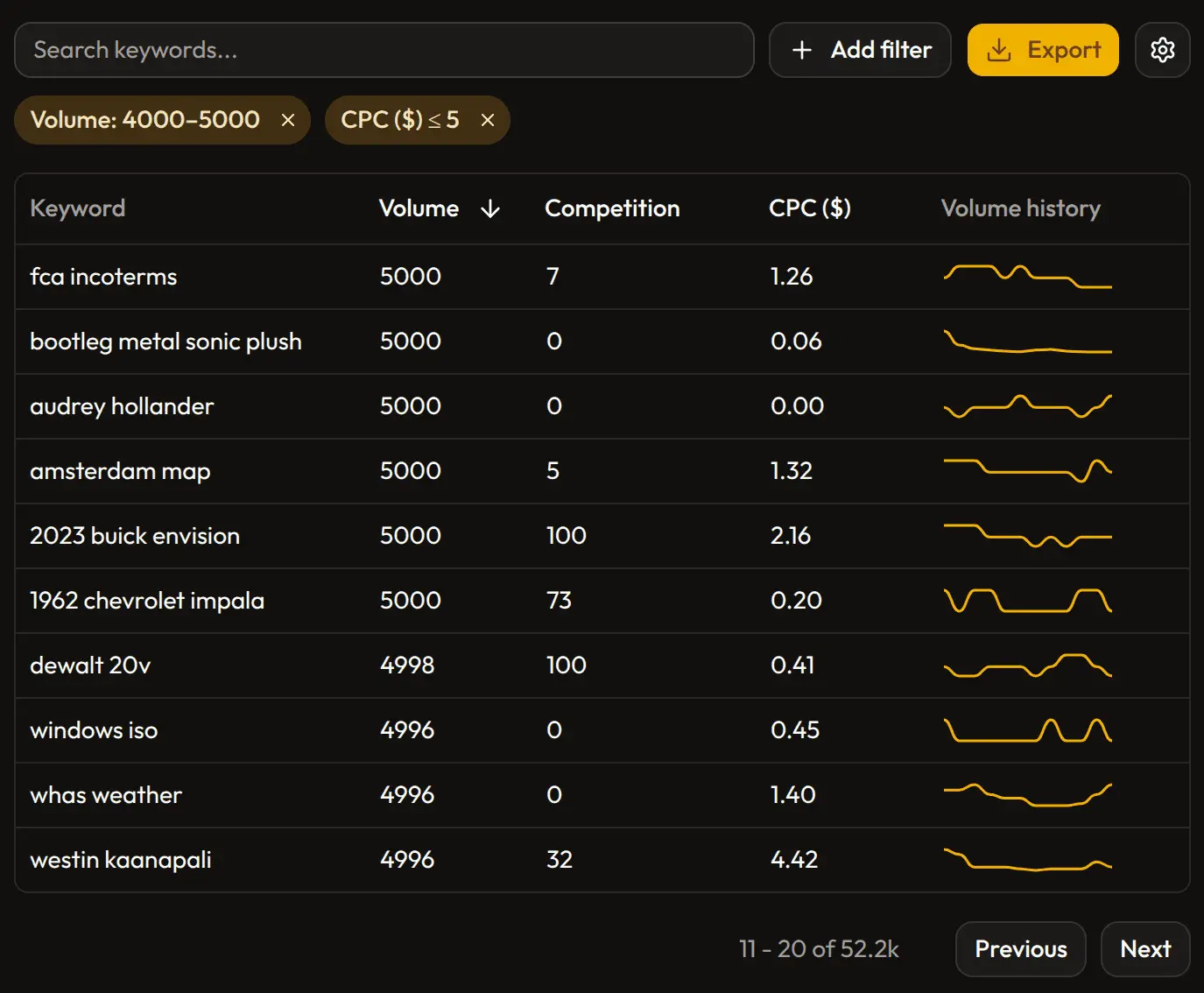
This makes a different kind of research possible. Instead of validating ideas you already have, you can discover opportunities you weren't looking for. Below is an example of a search. It shows there are 53 thousand results of keywords with volume between 4000 and 5000 and with cost-per-click less than 5$.
Volume Accuracy: The Grouping Problem
This is where Google Keyword Planner has a significant and well-known limitation.
Google groups keywords by intent when reporting search volume. This means a misspelling like youtube_ is shown as having the same volume as youtube (226 million monthly US searches in March 2026) because Google treats them as the same query intent. The same happens for many other keyword variations: plural/singular pairs, transpositions, and typos all collapse into a single volume number.
In practice, this produces a list full of weird, seemingly high-volume keywords that aren't actually sending that traffic independently. It's not a minor data quality issue — it fundamentally limits how much you can trust the numbers for individual keywords.
KeywordsDB uses statistical methods to estimate per-keyword volumes rather than inheriting Google's grouping behavior. The result is more useful for research: volumes reflect individual keywords more accurately, and you won't see a long-tail misspelling claiming 100 million monthly searches.
Here's an example for terms similar in the youtube group (there are actually more than 1000 of such terms):
| Keyword | Keyword Planner Volume | KeywordsDB Volume |
|---|---|---|
| youtube | 226M | 169M |
| youtbe | 226M | 1.4M |
| youtub | 226M | 1.3M |
| youu tube | 226M | 1M |
| 7youtub | 226M | 1M |
Bing Data
Google Keyword Planner only covers Google Search. KeywordsDB also includes Bing keyword data, which is useful for:
- Audiences that skew older or more enterprise-focused
- Markets where Bing has a meaningful share
- Cross-referencing volume signals between search engines
Both data sources are accessible through the same interface and filters.
Pricing
Google Keyword Planner is free, with the caveat that full exact-match volume data is only available if you have active ad spend. For many researchers, the practical cost is either running dummy campaigns or working with ranges.
KeywordsDB is $9/month for unlimited searches after 10 free queries. There are no per-query charges, no usage caps, and no need to maintain ad campaigns to keep accessing the data.
For anyone doing keyword research regularly — whether for SEO, content strategy, or competitive analysis — the cost difference is likely smaller than it appears when you account for the time saved and the data quality improvement.
Who Should Use Each
Google Keyword Planner makes sense if:
- You're already running Google Ads and want native integration
- You only need rough volume ranges occasionally
- You prefer not to pay for a separate tool
KeywordsDB makes sense if:
- You want accurate, per-keyword volume estimates
- You need to explore keywords without starting from a seed term
- You want Bing data alongside Google data
- You want a tool built for research, not ad buying
Try KeywordsDB for Free
You get 10 free searches when you sign up — no credit card required. It's enough to run a few real queries, apply some filters, and see whether the workflow fits what you're doing.
Related Articles

Ahrefs vs KeywordsDB: Keyword Research Alternative
Comparison between Ahrefs and KeywordsDB. Ahrefs offers more SEO functionality, while KeywordsDB is simpler, cheaper and excels in direct keyword research.

Semrush vs KeywordsDB: Simple Keyword Research Alternative
Semrush is a full SEO suite. KeywordsDB is a cheaper, simpler keyword research tool built for finding keyword opportunities fast.

Keysearch vs KeywordsDB: Comparing budget SEO tools
Comparison between two keyword research tools. Keysearch is a broader SEO product, while KeywordsDB is a cleaner, cheaper alternative focused on exploration.